30% EARLY BIRD price for the first 1,000 customers — lock in these prices before VAT applies.
Meet your agent
A chat window forgets. Your agent remembers.
Most AI tools are a chat window: you ask, it answers, and everything it did is gone when you close the tab. A Nexum agent is something else — a persistent AI worker with its own Linux machine in the cloud, ready when you are.
You give it a task, and it actually works on it: reading, writing, browsing the web, running commands and double-checking its own work along the way. Everything it builds — files, code, notes, projects — stays in your workspace between sessions, for as long as your plan is active.
And it can gain new tools as it goes — new tools go through a safety check and must be approved before use — so it gets better the longer you work together, without you ever touching a server.
The short version lives on the home page. Here is the full picture — including what truly sets a Nexum agent apart from a chatbot.
A real Linux machine — not a chat window
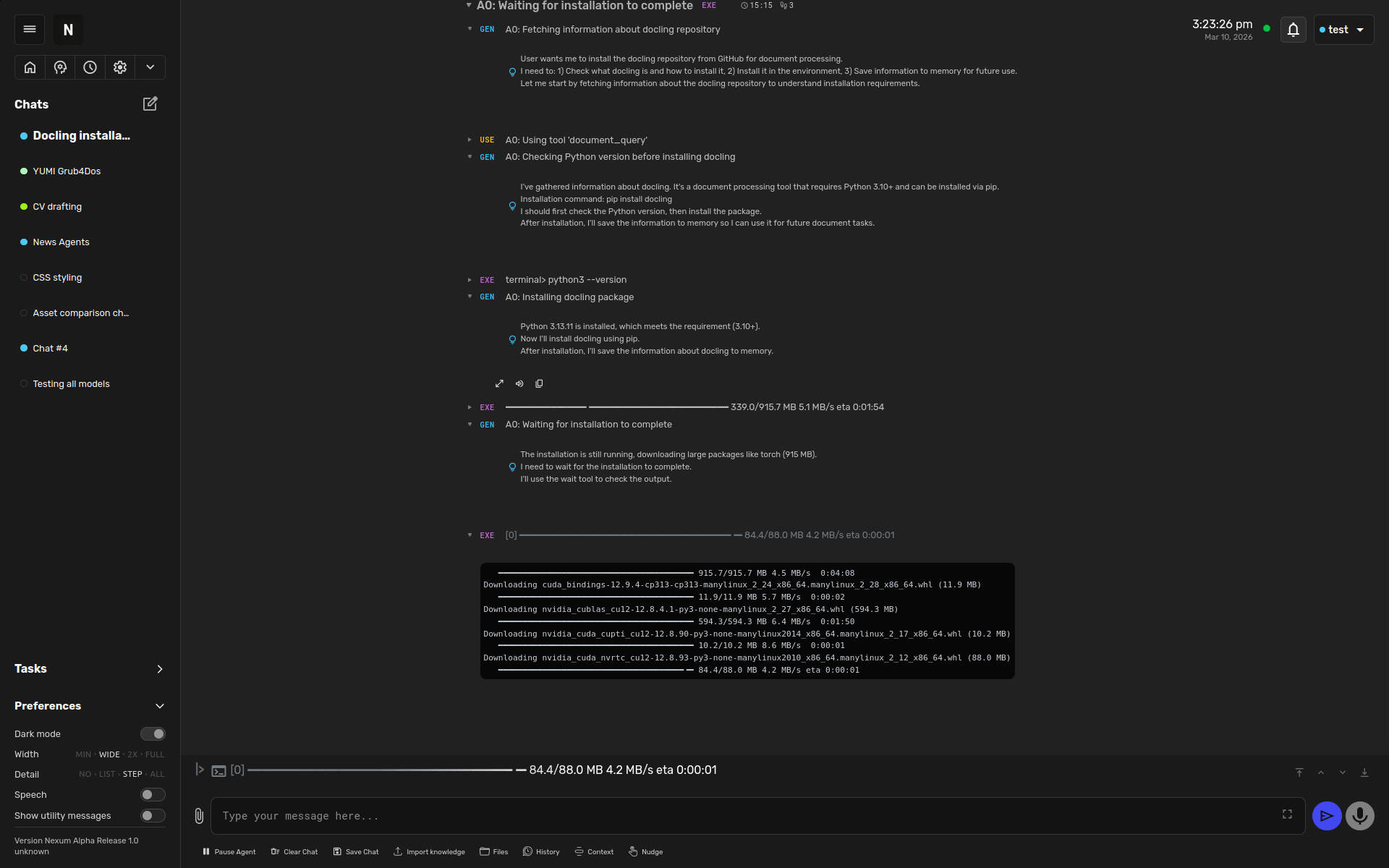
Your agent gets its own private Linux environment in the cloud: a terminal, a file system and a full web browser. It can develop, test and run code and applications — not just talk about it. Write a script, run it, see the result, fix the bug and run it again. All of that work stays in place between your sessions.
The agent plans, runs commands and installs what it needs — on its own.
Works in real documents — and writes with you
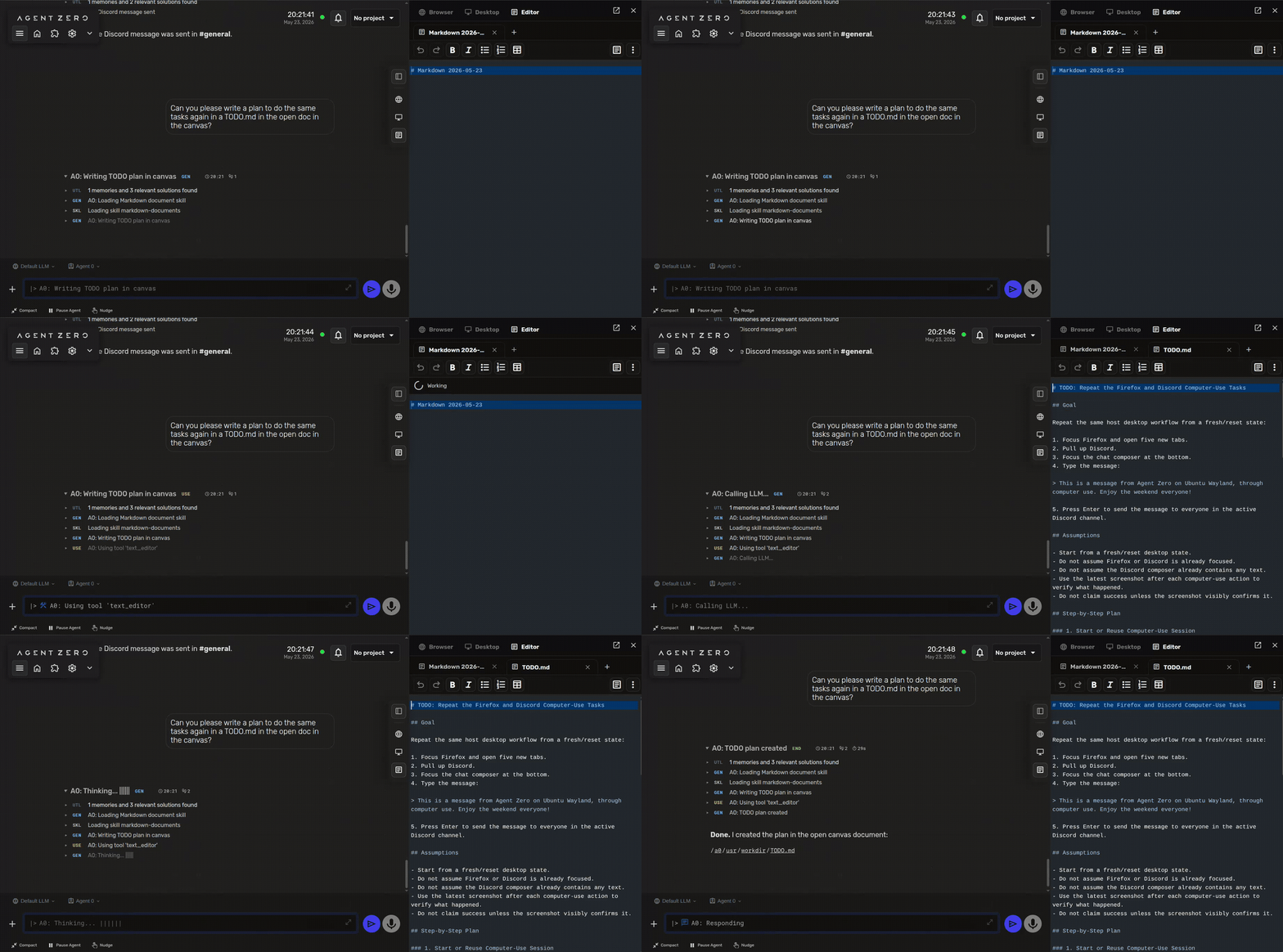
The agent works alongside you in real documents — texts, spreadsheets and presentations — instead of losing work in chat. Ask it to draft a plan in the open document and watch the text appear, character by character, while you keep typing in another section. Your edits and the agent's are equal operations on the same document. Plans, TODOs, meeting notes, handoffs — anything that deserves to live as a document, not chat scrollback. And it uses its browser as a tool: reading pages, filling in forms and pulling structured information out of websites.
Cowork on documents: the agent writes in the same document you have open — its edits and yours are equal.
Works with your own computer too
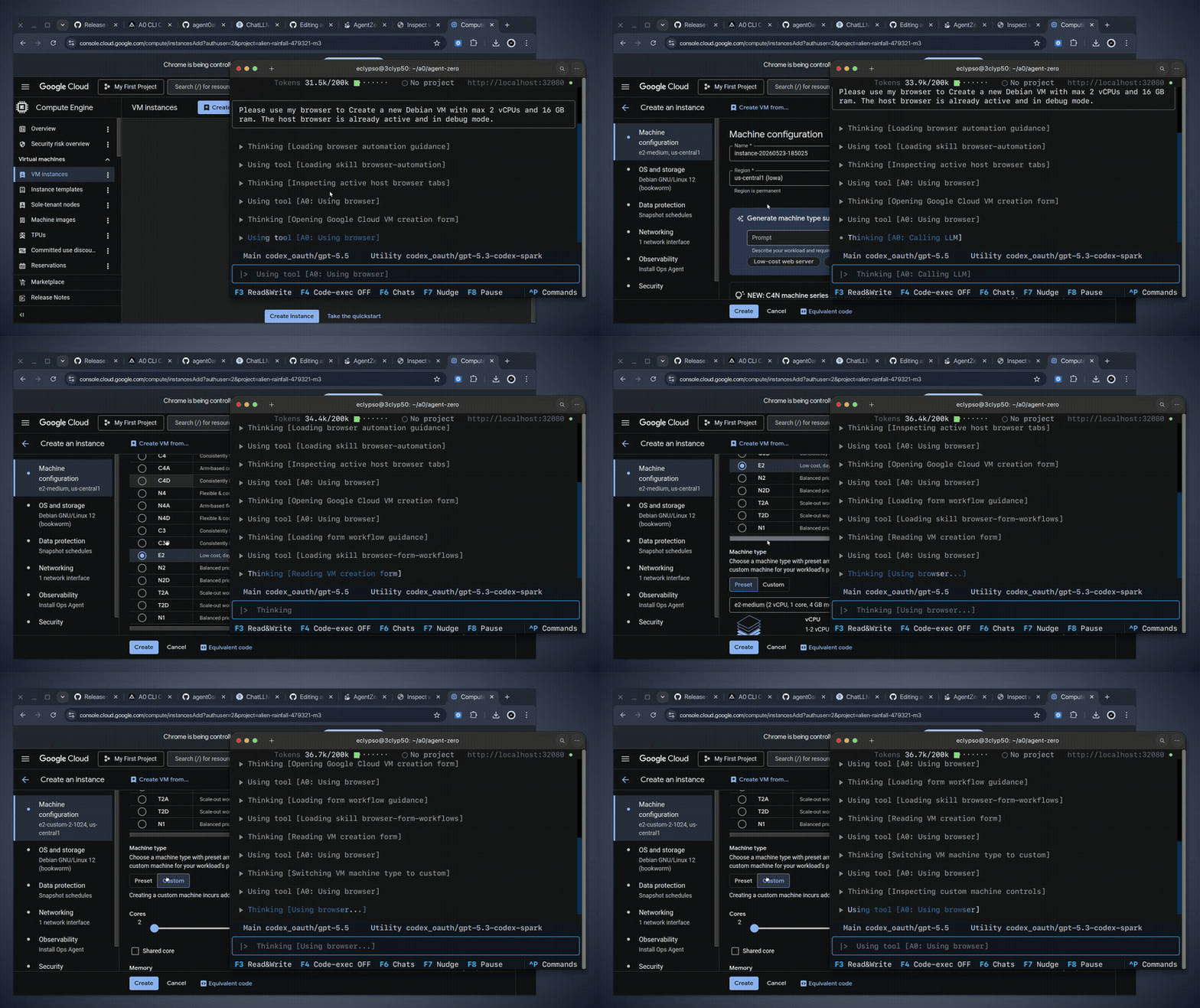
Your agent is not locked inside a browser window. When you allow it, it can reach tools on your own machine — so a task that starts in the cloud can finish on your desktop. You decide what it may touch, and you can withdraw the permission whenever you want.
Extend onto your own machine: when you allow it, the agent can reach the tools where you are.
Start from your own GitHub projects
When you start a new project, you can pick a public GitHub repository — or connect your private GitHub with your own login — and it is cloned into your project folder, ready to work on. Find an open-source project you want to change and make your own custom version. The repository's license applies when you change and share — your agent can help you check what it allows. Be your own software developer!
It builds its own tools — safely
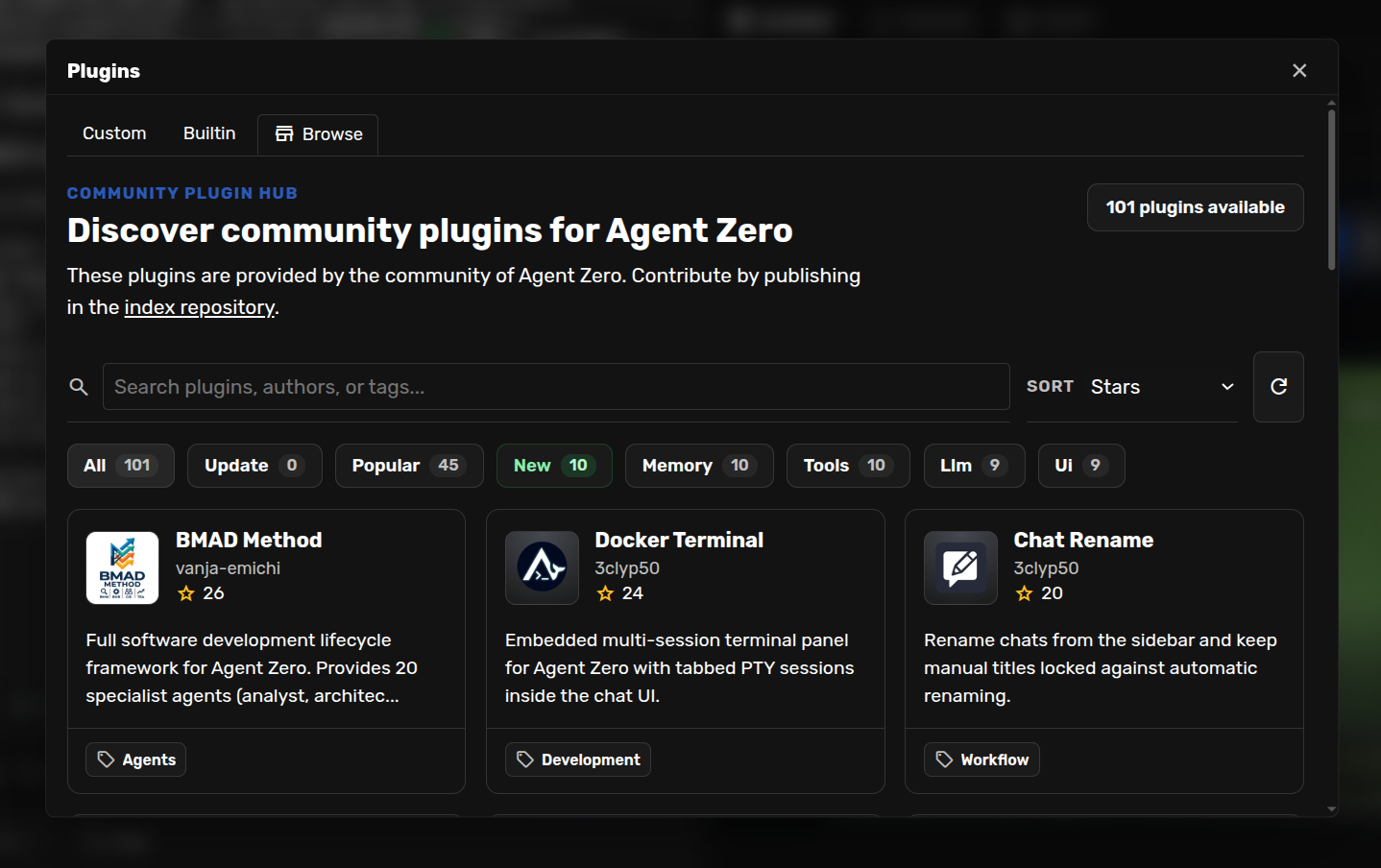
When your agent is missing a tool, it can build one itself — or browse a hub of 100+ community plugins and add new abilities: document handling, integrations and much more. New tools go through a safety check and must be approved before they can be used. You get an assistant that grows with your needs, without opening the door to strangers.
The plugin hub: browse 100+ community plugins and add new abilities whenever you need them.
It gets smarter the more you use it
Your agent remembers what matters. As you work together, the long and unimportant gets compressed over time — what is important stays. The more you use it, the more robust and capable it becomes at exactly what you do. And feel free to play and experiment: if you are curious, just try things out — that is how you discover what it can really do.
Time travel for everything it does
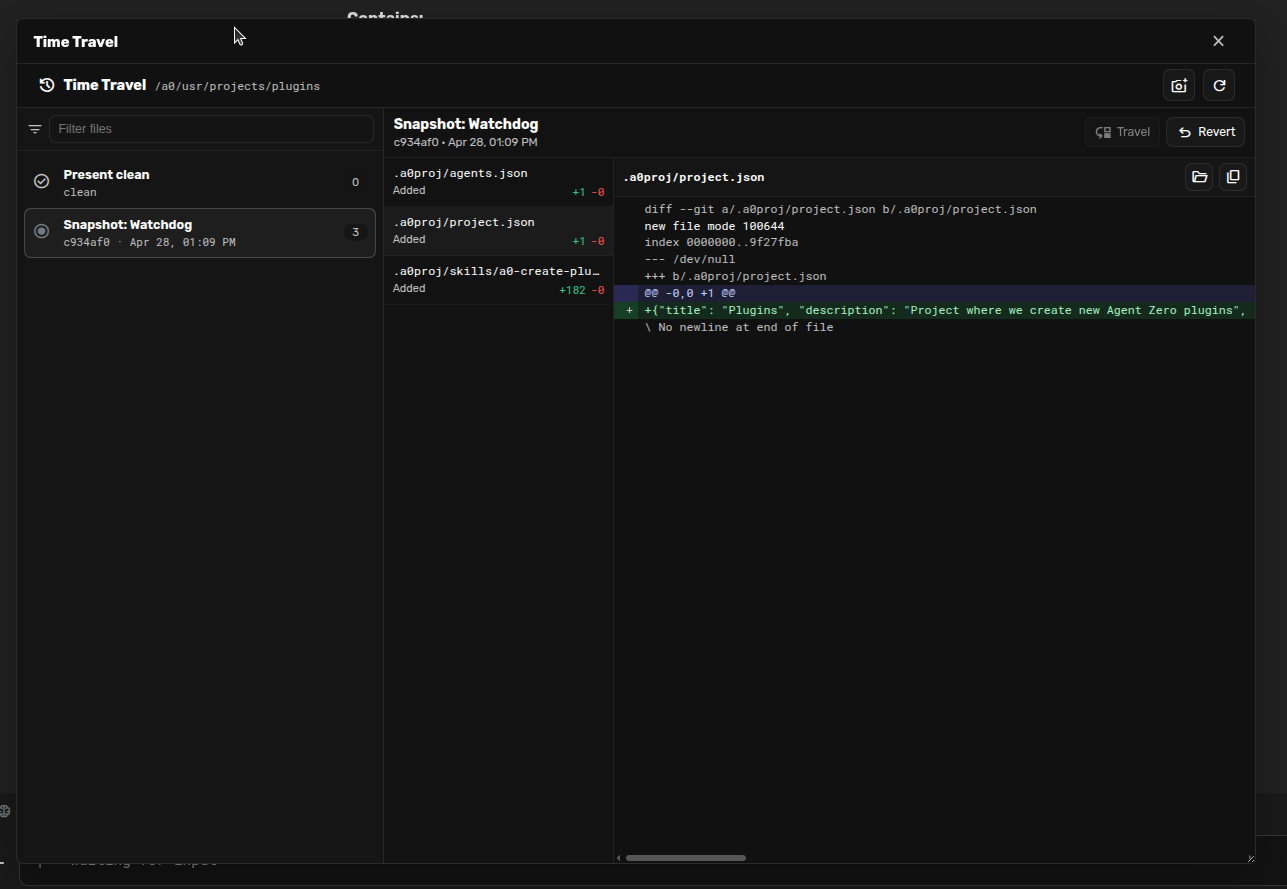
Work your agent does is recoverable by design. See exactly what changed, compare versions, inspect an earlier state and roll back whenever you want. A task that went wrong is never lost work — it is a few clicks back in time. That makes it safe to experiment: let the agent try something, knowing you can always return to what worked.
Version history: see what changed, compare and roll back whenever you want.
Your choice of AI models — with pseudonymity
Nexum routes your tasks to the AI providers that give the best results at fair prices. Your privacy is part of the design: we send only what your task needs — your name and contact details do not follow along, providers only meet a pseudonym. That makes it harder to trace you as a person, and you are never locked to a single provider.
Multiple agents working together
Big tasks get split up: your agent can delegate subtasks — research, coding, analysis — to helper agents and gather the results when they are done. You steer the main agent; the work happens in parallel.
Isolated by design
Your agent runs in its own shielded environment with only the resources it needs. It is separated from other customers' agents, and you decide who has access.
If your agent needs extra raw power — say, 3D work in Blender or other heavy creative projects — the Professional plan is built exactly for that.
A few examples of what your agent can take off your hands.
Writing and editing
Drafts, rewrites, translations, tone of voice, proofreading. From emails and blog posts to reports — in your style, in your languages.
Files and documents
Organize files, convert formats, pull data out of PDFs and spreadsheets, build overviews. Upload once — let the agent do the boring part.
Research and summaries
Send it out to dig through sources, articles and documents. It returns structured summaries, comparisons and answers — with the reading done, not just links.
Personal automation
Recurring tasks, checklists, planning, brainstorming. Teach it once how you want things done — after that, you just ask.
Web tasks and monitoring
Look up information across the web, follow developments in topics you care about, build structured overviews of what it finds.
Coding and your own programs
Write scripts, build small tools, debug code — and clone in GitHub projects you want to make your own. Your agent works in a real development environment and can build custom programs for whatever you need.
A Nexum agent is a powerful tool — with clear limits. Use it for your own, lawful tasks: no attacks on systems you do not own, no spam or bulk sending, no crypto mining. The details are in the terms of use — accounts that break them are closed.
Pick Small, Medium or Large in the customer portal and pay with Vipps, Klarna or card. Your plan sets the agent's resource budget — upgrade or cancel anytime.
2 Payment is verified
Before your agent is created, our own system double-checks the payment automatically. That extra check is why you will never pay for an agent that never shows up.
3 Your agent is provisioned
Your agent is created automatically with your plan's resources, its own private network and its own address. No tickets, no queues — provisioning starts the moment your payment clears.
4 Log in and run
You receive your login and the agent's personal address. Open it in any browser and go. Start, stop and renew everything yourself from the portal.
Ready to meet your agent?
Pick Small, Medium or Large — from $15/mo, 30% early bird for the first 1,000 customers. Month to month, cancel anytime.